Slide Settings Reference
Every option on BP_SimpleSlideSystem, as it appears in the Details panel under Slide.
Speeds are in centimetres per second, Unreal's standard unit. 100 cm/s = 1 m/s ≈ 3.6 km/h. So the default Max Speed of 1000 is about 36 km/h.
Settings are per instance. Select a slide in the level and change its settings in the Details panel — other slides aren't affected. Every setting also has a tooltip in the editor; just hover over it.
Slider range is the range you can drag in the Details panel. Limits are the hard minimum and maximum you can type. You can type values above the slider range where no maximum is listed.
- Activation (3)
- Movement (10)
- Camera (3)
- Exit (5)
- Audio (17)
- Debug (2)
- All settings at a glance
Activation
Who can ride, and when a ride is allowed to start.
Required Actor Class
Only Characters of this class (or its child classes) can ride the slide. Leave it as Character to let anyone ride, or set it to your player Blueprint to stop AI and NPCs from using it.
Activate On Overlap
Starts a ride automatically when a Character walks into the Entry Trigger. Turn this off if you want rides to start only from your own logic — for example an "interact" button — by calling Activate Slide.
Cooldown Time
Seconds after a ride ends before the slide accepts a new rider. This stops riders from immediately re-triggering the slide if they land near the entrance.
Typical values: 0.5–2.
Movement
How fast the rider goes, how the camera follows, and how the rider sits on the path.
Initial Speed
How fast the rider is moving (cm/s) the moment the ride begins, after they've blended onto the slide. 0 starts from a standstill and lets the slope do the work.
Typical values: try 300–600 for a "pushed off" start.
Max Speed
The fastest the rider can go, in cm/s (1000 ≈ 36 km/h). However steep the slide, the rider never goes faster than this.
Typical values: 800–2500.
Min Speed
The slowest the rider can go, in cm/s. This keeps riders moving through flat or uphill sections instead of stopping.
Typical values: values below 50 can feel stuck on flat parts; 100–200 keeps rides flowing smoothly.
Acceleration
A constant push that speeds the rider up every second, no matter the slope (cm/s per second). Set to 0 for a slide driven purely by gravity, or raise it for slides that should keep speeding up on flat sections.
Slope Influence
How much the slide's steepness affects speed. Steep downhill sections speed the rider up; uphill sections slow them down.
Guide: 0 = ignore the slope, 1 = natural, 2 = exaggerated.
Each frame the rider speeds up by Acceleration, plus gravity along the slope multiplied by Slope Influence (downhill speeds up, uphill slows down). The result is always kept between Min Speed and Max Speed.
Rotation Interp Speed
How quickly the camera turns to follow the slide. Only used when Face Slide Direction is on.
Guide: 6–10 follows twists and turns closely while staying smooth. Low values (1–3) feel floaty and fall behind on twisty slides — the camera can end up facing sideways. Above 12 feels almost instant.
Face Slide Direction
Turns the player's view to look down the slide. Your character's camera must have Use Pawn Control Rotation enabled for this to be visible. By default players can still glance left and right within Free Look Yaw Limit; set that to 0 to lock the view and pause mouse look for the ride. Turn Face Slide Direction off to let players look around completely freely while sliding.
See Camera requirements.
Free Look Yaw Limit
Only used when Face Slide Direction is on. How far (in degrees) the player can look left or right of the slide direction while riding. The camera still follows the slide; this is how far the player can turn it away from straight ahead. Up and down mouse movement is ignored during the ride.
Guide: 0 = camera locked to the slide direction (no free look, mouse look paused). 30–60 lets players glance around without losing the sense of direction.
Entry Blend Time
Seconds the rider takes to glide smoothly from where they touched the trigger to the top of the slide. Lower values feel snappier.
Typical values: 0.3–1.
Rider Height Above Path
Raises the rider above the spline, in cm. A Character's position is the centre of its collision capsule, so if your spline runs along the slide's surface, set this to about half the capsule height (around 88 for the Unreal mannequin) so the rider sits on top instead of sinking in.
This setting has no hard minimum on purpose — a small negative value can be useful for low-slung slides.
Camera
Optional speed effect for the rider's camera.
Speed FOV
Widens the rider's field of view as they speed up, for a stronger sense of speed. The field of view eases toward its starting value plus Speed FOV Boost × (current speed ÷ Max Speed), so the full boost is reached at Max Speed. After the ride it eases back to the original value, then is restored exactly.
Uses the first Camera Component on the rider. Enable this effect only when that component drives the active view. Disable it for incompatible custom camera rigs.
Speed FOV Boost
How many degrees the field of view widens at Max Speed. Only used when Speed FOV is on.
Guide: 5–10 is subtle, 15 is noticeable, 25+ is a strong stretch best kept for very fast rides.
Speed FOV Interp Speed
How quickly the field of view follows speed changes during the ride, and how quickly it eases back afterwards. Higher values react faster; lower values feel smoother.
Exit
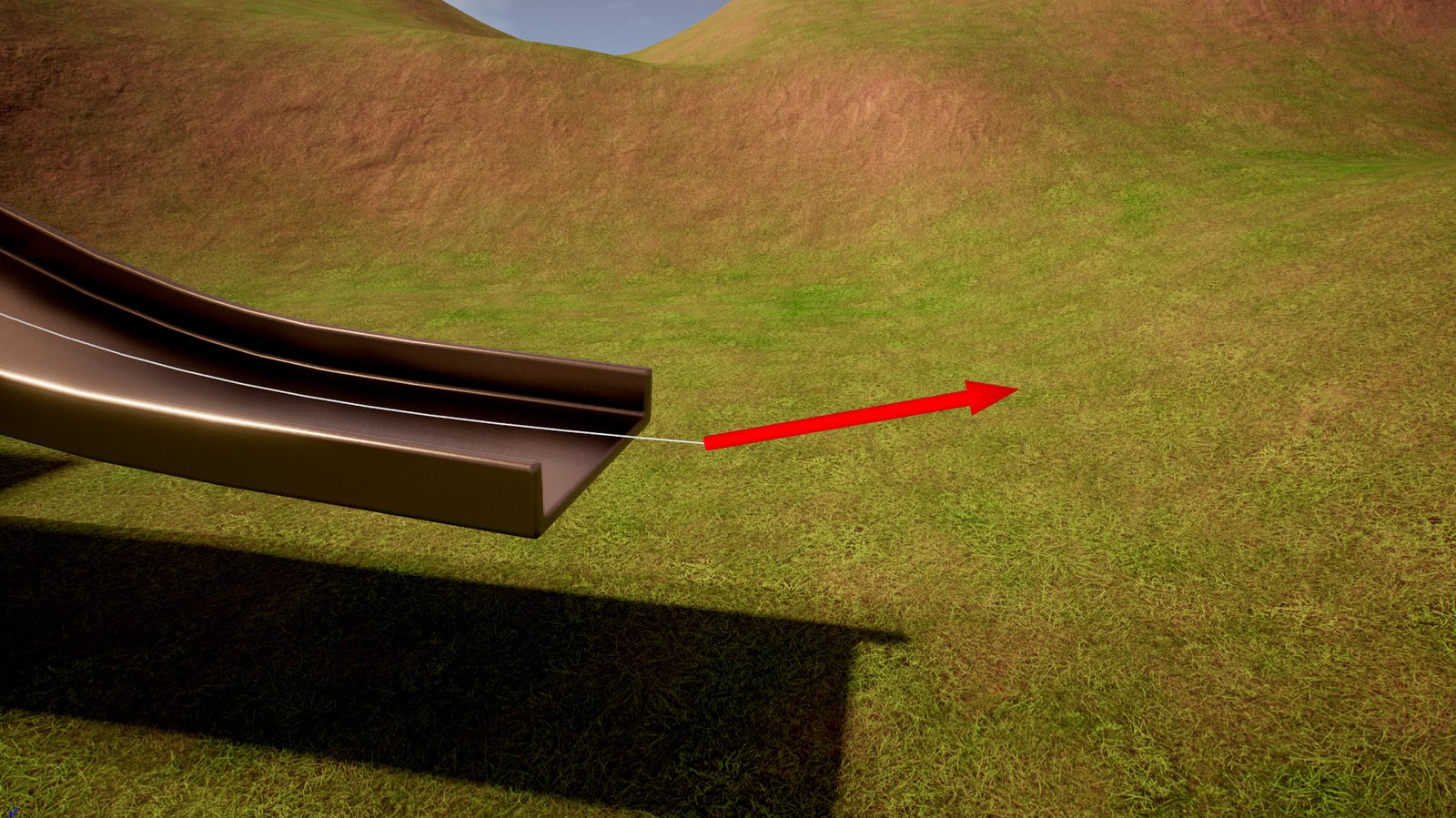
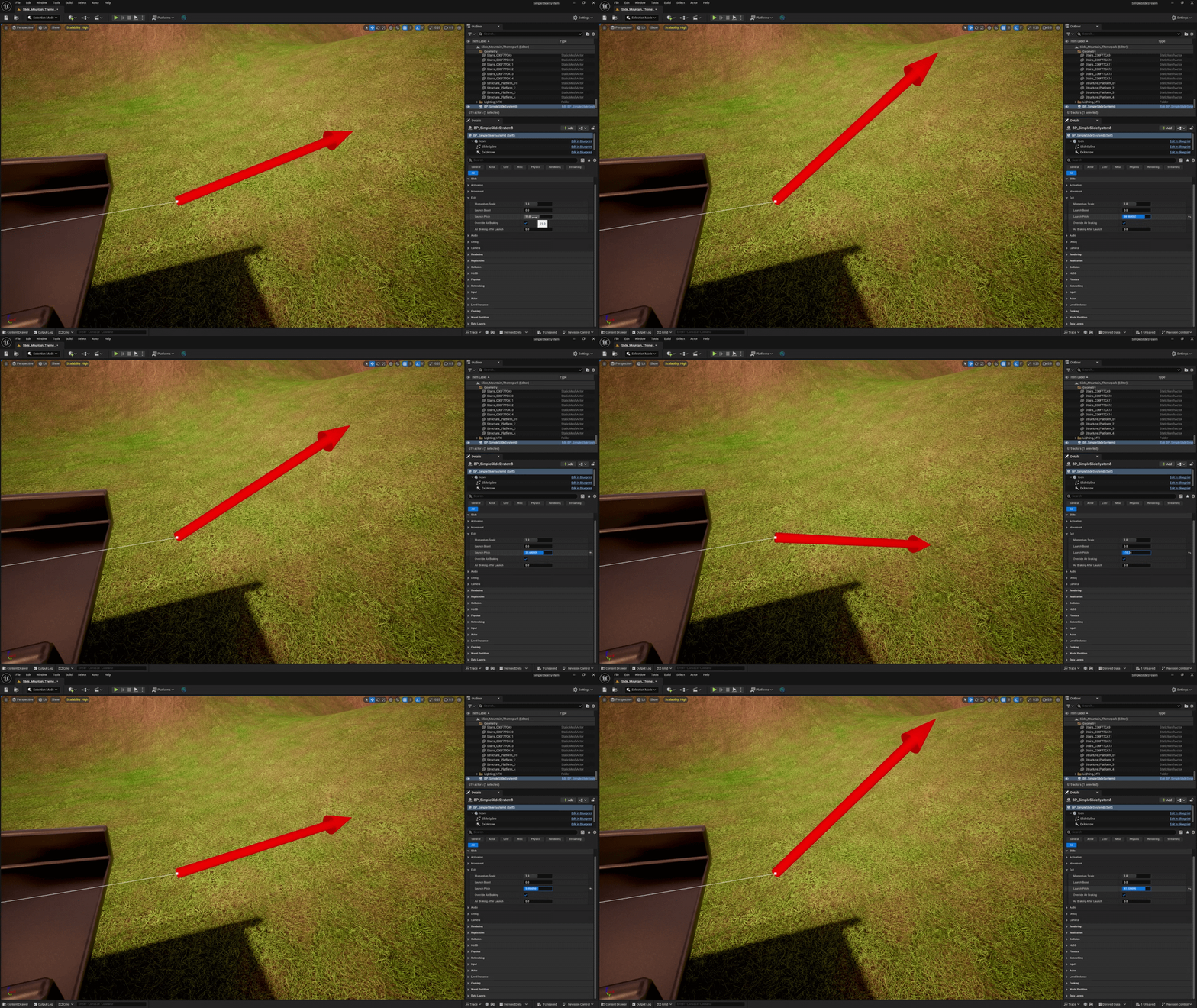
How the rider leaves the slide. The Exit Arrow in the viewport previews the launch direction as you change these.
Momentum Scale
How much of the rider's slide speed carries into the launch at the end.
Guide: 0 = the rider simply drops off the end, 1 = keeps all their momentum, above 1 = launches faster than they were sliding.
Launch Boost
Additional launch speed applied when the rider exits the slide, in cm/s. Increase for more dramatic launches, or leave at 0 for realistic momentum-based exits.
Launch speed = slide speed × Momentum Scale + Launch Boost (never below zero). The direction follows the end of the slide, tilted by Launch Pitch.
Launch Pitch
Tilts the launch upward by this many degrees on top of the slide's own end angle (negative values tilt it down). The final angle is limited to ±89°. The Exit Arrow in the viewport shows the resulting launch direction.
Override Air Braking
Temporarily replaces the rider's air braking after launch so they keep their momentum through the air, then restores their original setting when they land (or after 5 seconds at most). This changes Character Movement › Braking Deceleration Falling on the rider.
Air Braking After Launch
The air braking value used while Override Air Braking is active. 0 means no air braking, so the rider flies the full launch arc. Higher values slow them down in the air.
Audio
Sounds played during the ride. Any sound can be left empty to disable it.
Sit Sound
Played once when the ride starts (after the rider has blended onto the slide). Leave empty for no sound.
Loop Sound
Looping sound that follows the rider while they slide, and fades out over Slide Fade Out Time when they exit. Use a sound that is set to loop.
Exit Sound
Optional sound played once at the bottom of the slide when the rider reaches the end. It isn't played if the ride is cancelled early.
Volume Multiplier
Volume for all slide sounds (sit, loop, exit and wind). 0.5 = half volume, 2 = double.
Loop Start Delay
Seconds after the ride starts before the sliding loop begins. Gives the sit sound time to play first.
If a ride is shorter than Loop Start Delay, the rider reaches the end before the loop starts and it won't be heard. Lower the delay for short slides.
Sliding loop volume and fades
Fine-tune the sliding loop (Loop Sound) separately from the other sounds.
| Setting | Default | What it does |
|---|---|---|
| Slide Loop Volume SlideLoopVolume | 1.0 | Volume of the sliding loop, multiplied by Volume Multiplier. |
| Slide Fade In Time SlideFadeInTime | 0 s | Seconds the loop takes to fade in once it starts. |
| Slide Fade Out Time SlideFadeOutTime | 0.3 s | Seconds the loop takes to fade out when the rider exits. A cancelled ride stops it instantly. |
Wind Audio
An optional wind loop that plays alongside the sliding loop and responds to speed: it gets louder and higher-pitched as the rider speeds up. It starts when the ride begins, follows the rider, and fades out after the exit — so it carries on through the launch. Leave Wind Loop Sound empty to disable wind.
Wind intensity eases between Min Speed (quietest, lowest pitch) and Max Speed (loudest, highest pitch).
| Setting | Default | What it does |
|---|---|---|
| Wind Loop Sound WindLoopSound | WindLoop | The looping wind sound. Use a sound that is set to loop. |
| Wind Loop Volume WindLoopVolume | 0.75 | Overall wind volume, multiplied by Volume Multiplier. |
| Wind Volume At Min Speed WindVolumeAtMinSpeed | 0 | Wind volume at Min Speed (before Wind Loop Volume is applied). |
| Wind Volume At Max Speed WindVolumeAtMaxSpeed | 0.75 | Wind volume at Max Speed. |
| Wind Pitch At Min Speed WindPitchAtMinSpeed | 0.8 | Wind pitch at Min Speed. |
| Wind Pitch At Max Speed WindPitchAtMaxSpeed | 1.3 | Wind pitch at Max Speed. |
| Wind Interp Speed WindInterpSpeed | 1.0 | How quickly the wind follows speed changes. Lower values feel smoother. |
| Wind Fade In Time WindFadeInTime | 2 s | Seconds the wind takes to fade in at the start of the ride. |
| Wind Fade Out Time WindFadeOutTime | 1 s | Seconds the wind takes to fade out after the exit. A cancelled ride stops it instantly. |
Debug
Tools for tuning and troubleshooting. Both only appear in the editor and development builds — never in shipped games — so it's safe to leave them on while you work.
Draw Debug
Shows a sphere and the current speed on the rider while sliding — useful when tuning speeds. Only appears in the editor and development builds, never in shipped games.
Print State
Prints each step of the ride (Entering, Sliding, Cooldown) to the screen and Output Log. Useful for troubleshooting. Only appears in the editor and development builds.
All settings at a glance
| Setting | Group | Default | Slider | Limits |
|---|---|---|---|---|
| Required Actor Class | Activation | Character | — | — |
| Activate On Overlap | Activation | On | — | — |
| Cooldown Time | Activation | 1.0 | 0 – 5 | ≥ 0 |
| Initial Speed | Movement | 0 | 0 – 1500 | ≥ 0 |
| Max Speed | Movement | 1000 | 100 – 3000 | ≥ 0 |
| Min Speed | Movement | 5 | 0 – 500 | ≥ 0 |
| Acceleration | Movement | 100 | 0 – 1000 | ≥ 0 |
| Slope Influence | Movement | 1.0 | 0 – 3 | ≥ 0 |
| Rotation Interp Speed | Movement | 8.0 | 0.5 – 15 | ≥ 0 |
| Face Slide Direction | Movement | On | — | — |
| Free Look Yaw Limit | Movement | 50 | — | — |
| Entry Blend Time | Movement | 1.0 | 0.05 – 3 | ≥ 0 |
| Rider Height Above Path | Movement | 0 | 0 – 150 | None |
| Speed FOV | Camera | Off | — | — |
| Speed FOV Boost | Camera | 15 | — | — |
| Speed FOV Interp Speed | Camera | 4.0 | — | — |
| Momentum Scale | Exit | 1.0 | 0 – 2 | ≥ 0 |
| Launch Boost | Exit | 0 | 0 – 2000 | ≥ 0 |
| Launch Pitch | Exit | 15 | −45 – 60 | −89 – 89 |
| Override Air Braking | Exit | On | — | — |
| Air Braking After Launch | Exit | 0 | 0 – 2000 | ≥ 0 |
| Sit Sound | Audio | Sit_on_Slide | — | — |
| Loop Sound | Audio | SlidingLoop | — | — |
| Exit Sound | Audio | None | — | — |
| Volume Multiplier | Audio | 1.0 | 0 – 2 | ≥ 0 |
| Loop Start Delay | Audio | 1.0 | 0 – 3 | ≥ 0 |
| Slide Loop Volume / Fade In / Fade Out | Audio | 1.0 / 0 / 0.3 | — | — |
| Wind Audio (9 settings) | Audio | WindLoop, see table | — | — |
| Draw Debug | Debug | Off | — | — |
| Print State | Debug | Off | — | — |